

Most B2B SaaS founders either spend too little on LinkedIn Ads to see results, or too much without a framework to justify it. The conversation usually goes like this: “We tried LinkedIn Ads, spent €3.000, got nothing, turned it off.”
That’s not a LinkedIn problem. That’s a budgeting problem. And there’s a formula for this. Four variables. You can run the numbers in two minutes. Here’s how.
Contents
Why LinkedIn Ads budgeting works differently
LinkedIn is not Google. On Google, you bid for intent. Someone types “best project management software,” and you show up. The signal is clear: this person is looking for something.
LinkedIn doesn’t work that way. Your audience isn’t actively searching. You’re reaching people who match your ICP but may not be in-market yet. So the whole logic of how you budget needs to be different.
On Google, you can spend €500 and get 25 high-intent clicks. On LinkedIn, €500 might reach 5,000 people once. Both can work. They’re just solving different problems.
LinkedIn’s job is to build familiarity before buyers enter the market. That requires repetition. Which means you need a budget framework built around frequency, not just reach.
The LinkedIn Ads Budget Formula
Monthly Budget = (Audience Size × Active Users% × CPM × Frequency) ÷ 1.000That’s it. Four inputs. One output.
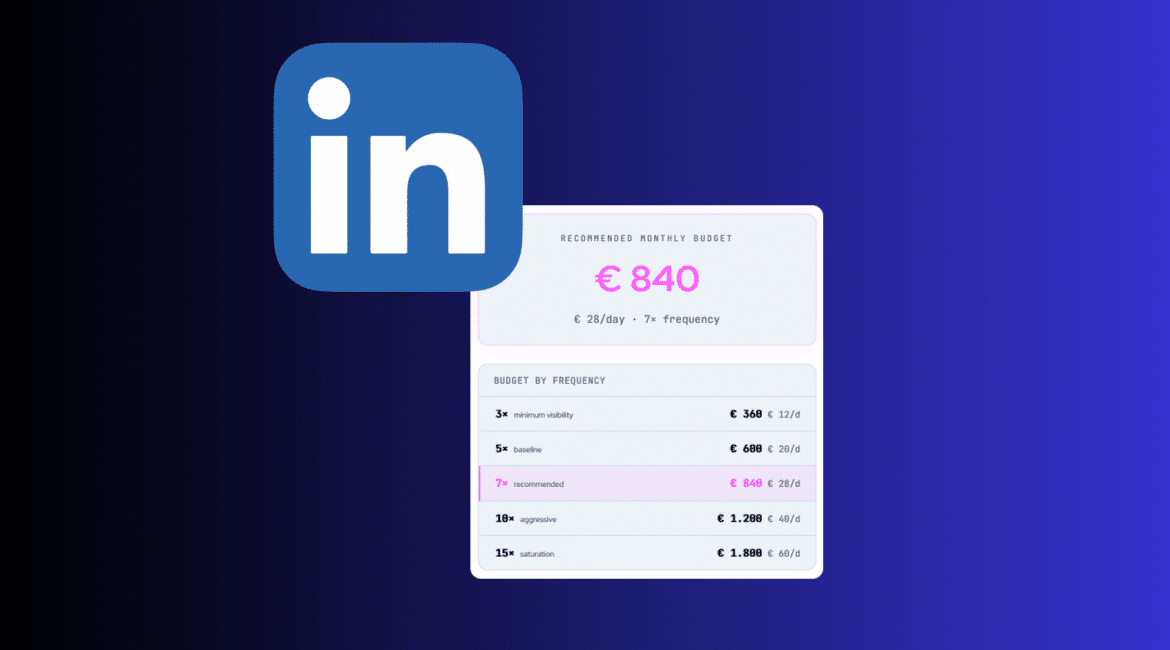
Want to know what your ideal budget is? Use the interactive LinkedIn Ads budget calculator:
Let’s break down each variable so you know what to plug in.
The four variables to calculate your LinkedIn Ads budget
LinkedIn has no intent signal like Google. It cannot tell you who is actively researching your category right now. Frequency is how you compensate for that. It’s not a nice-to-have. It’s the thing that turns impressions into familiarity.
1. Audience Size
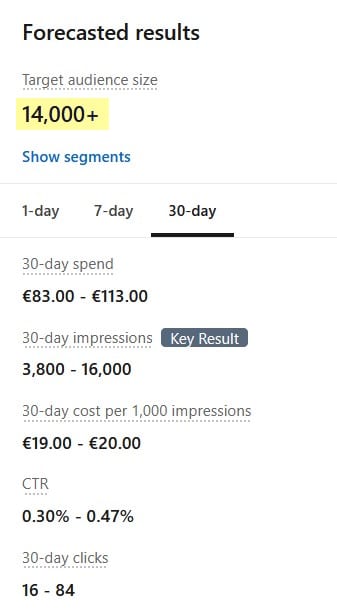
Go to LinkedIn Ads Manager and create a draft campaign with your targeting criteria: job titles, company size, industry, geography. LinkedIn will show you an estimated audience size on the right side.
Optimal range for B2B SaaS: 10.000 to 50.000 people. Below 10.000, your CPM will climb steeply. Above 100.000, your message gets diluted across too many people who only loosely match your ICP.
2. Active users
Not everyone in your audience logs into LinkedIn regularly. Research suggests 30 to 50% of a B2B audience is active in any given month. Use 40% as your default.
This is the variable most budget calculators skip entirely, which is why most estimates come out too high. If you base your budget on the full audience size, you’re paying to reach people who will never see the ad.
3. CPM (cost per 1.000 impressions)
Your CPM depends on how competitive your audience is:
- Mass market audiences: €15 to €40
- Mid-market B2B (operations managers, marketing managers): €40 to €70
- Senior and niche SaaS audiences (CMOs, VPs of Engineering, fintech founders): €70 to €130
Don’t guess. Run a test campaign with €150 to €200, let it run for 5 to 7 days, and check your actual CPM in the campaign dashboard. That number is more reliable than any industry average.
4. Frequency
The LinkedIn Ads frequency is used to determine how many times you want to reach each person per month. The recommended range is 5 to 7 impressions. Below 5, you fall under the recognition threshold: most people won’t remember seeing your ad once. Above 10, you risk ad fatigue and pay for diminishing returns.
LinkedIn has no intent signal like Google. It cannot tell you who is actively researching your category right now. Frequency is how you compensate for that. It’s not a nice-to-have. It’s the thing that turns impressions into familiarity.
Two worked examples of LinkedIn Ads budget planning
Scenario 1: Early-stage SaaS, niche audience
- Audience size: 15,000
- Active users: 40% (6.000 people)
- CPM: €80
- Frequency: 5×
- Budget = (6.000 × 80 × 5) ÷ 1.000 = €2.400/month
This is a realistic starting budget for a founder-led brand building awareness in a well-defined niche. At €2.400/month, you reach 6.000 relevant people five times. Enough to start building recognition before they enter the buying process.
Scenario 2: Scale-up SaaS targeting CFOs and finance directors in the Benelux
- Audience size: 22,000
- Active users: 35% (7,700 people): senior audiences tend to log in less frequently than mid-level roles
- CPM: €110 (senior finance audience, competitive)
- Frequency: 7×
- Budget = (7.700 × 110 × 7) ÷ 1,000 = €5.929/month
Senior finance audiences are expensive to reach, but they convert at higher rates and with shorter internal approval cycles. At 7× frequency, you’re in front of every active CFO in your target market more than once a week. By the time they’re evaluating tools, you’re already a familiar name.
Note: you’re not running one LinkedIn Ads campaign
The formula calculates the budget for one audience layer. But a real LinkedIn Ads setup has at least two: cold and warm.
Cold: Your full ICP. People who’ve never heard of you. This is where the formula above applies. High frequency, awareness-focused creative, longer time horizon before you see pipeline impact.
Warm: People who’ve already interacted with you. Website visitors, video viewers, post engagers. This audience is smaller, so the CPM is lower and the frequency target can be lower too. But the conversion rate is much higher, which is why you always run both in parallel.
A typical split for an early-stage SaaS might look like this:
| Layer | Audience | Budget |
| Cold (ICP awareness) | 15.000 | €2.400/month |
| Warm (retargeting) | 1.500-3.000 | €400–600/month |
| Total | €2.800–3.000/month |
The warm budget is small because the audience is small. But it punches well above its weight in conversions. If you only run cold, you’re building familiarity without capturing the people who are already showing interest.
Start with cold to build the pool. Add warm once you have enough traffic and engagement to retarget.
Don’t know your CPM yet? Start from your pipeline goals
If you don’t have a CPM estimate yet, use the bottom-up approach instead.
- Check LinkedIn’s suggested bid range in Ads Manager for your audience and ad format.
- Estimate how many clicks you need per demo request. For cold LinkedIn traffic, expect 100 to 200 clicks per conversion depending on your landing page and offer.
- Decide how many demos you want per month.
- Calculate: cost per click × clicks per demo × desired demos = monthly budget.
Example:
- CPC: €18
- Clicks needed per demo request: 150 (roughly 0.7% conversion rate, realistic for cold LinkedIn traffic)
- Desired demos per month: 5
- Total clicks needed: 150 × 5 = 750 clicks
- Monthly budget: 750 × €18 = €13.500/month
This approach works well when you already have campaign data. The formula approach works better when you’re starting from scratch and want to anchor your budget to reach and frequency rather than conversion targets.
Run both. If they produce very different numbers, that’s a signal worth investigating before you commit to a budget.
Frequently asked questions about LinkedIn Ads budgets
How do I know if my CPM estimate is accurate?
You don’t, until you test. Run a campaign with €150 to €200, let it run for 5 to 7 days, and check the CPM in your campaign dashboard. That’s your real number. CPMs vary significantly by audience, ad format, and bidding strategy. Industry averages are starting points, not targets.
Is LinkedIn Ads worth it for early-stage SaaS?
It depends on your ICP. If your buyers are active on LinkedIn and your sales cycle is long enough that brand awareness compounds into pipeline, yes. If your buyer is a small business owner who isn’t on LinkedIn, the budget is better spent elsewhere. LinkedIn works best when you have a clear, senior buyer persona and when authority compounds faster than paid acquisition burns cash.
What’s the minimum budget to see real results from LinkedIn Ads?
There’s no universal floor, but €1,500 to €2,000 per month is typically the minimum, and that’s across all layers combined: cold awareness, warm retargeting, and at least 2 to 3 ad creatives running simultaneously.
LinkedIn needs enough budget per campaign to exit the learning phase and gather meaningful data. Split €1,500 across too many campaigns or too many creatives and none of them get enough impressions to work. If that’s not feasible right now, start with organic founder content before layering in paid.
Organic authority doesn’t lower your CPM, that’s set by the auction, but it does improve your CTR and conversion rate, so you get more out of every impression when you do turn on ads.
One more thing worth knowing: LinkedIn lets you run your best-performing organic posts as Thought Leader Ads. Instead of creating new ad creative from scratch, you take a post that already proved it resonates and push it as a paid ad to your exact ICP. Lower production cost, higher credibility (it shows as a personal post, not a brand ad), and you already know it works.
Conclusion
LinkedIn Ads are not complicated. But they work differently than search. You’re not buying clicks from people who are ready to buy. You’re buying repetition with people who will eventually be ready to buy. That’s a different game, and it needs a different budget logic.
The formula gives you a number to start with. The test campaign tells you if your CPM estimate was right. And the frequency table shows you what you’re actually buying at each spend level.