

Open ten B2B SaaS homepages in ten tabs and cover the logos. Most of them become interchangeable: the same centered headline, the same pill badge above it, the same row of cards underneath, the same blue-violet glow behind the hero.
Each page is competent. None is memorable. People spot the AI-generated look quickly, the way they once spotted an Elementor site or a stock WordPress theme, and many call it AI slop. Spotting it is not the same as being hurt by it, and no study I found shows that it costs deals. What it costs is distinctiveness. Nobody seems to have decided anything.
I’ve built websites for more than 20 years and once ran a web agency, so the look jumps out at me. I also find it bland. Taste is subjective, and mine isn’t evidence. What follows separates what you can check from what is opinion.
Why AI-generated websites end up looking alike
A model builds a page from the average of every page it has seen. Ask for a SaaS landing page and you get the most likely one, down to the font, the gradient and the order of the sections.
The same pull shows up in writing. In a 2024 Science Advances experiment, Doshi and Hauser found that stories written with AI-suggested ideas were rated more creative, yet measurably more similar to each other. It covers short stories, not websites, but it describes the mechanism.
People ship these defaults too. WordPress themes and Elementor kits did it for years, and component libraries make the same choices unless someone overrides them. A 2021 CHI study analyzed about 228,000 screenshots of roughly 10,500 websites from 2003 to 2019 and found sites growing more alike from 2007 onward, most of all in layout. It predates generative AI and covers the American web.
So read the signs below as a checklist and not as a lie detector. The useful question is whether anyone chose this, not whether a machine made it.
What the evidence says about AI slop design
Most checklists are pattern recognition by designers and developers. A few people did measure.
Developer Adrian Krebs ran a headless browser over about 1,600 recent Show HN landing pages and applied one deterministic test per pattern. He put 22% in the heavy band (four or more patterns), 32% in the middle and 46% in the clean band. Roughly 5 to 10% were false positives. His sample is indie product launches, not B2B sites, and he says plainly that a single pattern proves nothing.
An IOV Labs paper from June 2026 built a detector around 27 tells and scored 202 well-regarded sites. The median site scored 0, where lower is better. Pages built from AI defaults scored 35 to 59, and the paper found that brand purple is not a tell, since Stripe uses it heavily and scores 0. Neither is Inter. Linear ships it with a real type system, and what gives a page away is defaults with nothing deliberate next to them.
Handle both with care. The paper is a single-author draft, and its thresholds were tuned on the same 202 sites, so top sites landing near zero is partly built in.
Do AI-looking websites cost trust or conversions?
No study I found tests that for AI-looking sites, and none tests it for B2B. What exists is older and adjacent.
Consumer research says looks shape credibility, but none of it concerns AI-looking sites:
- Fogg and colleagues at Stanford. 2,684 people judged the credibility of live websites. Design look was the most common factor in their comments, at 46.1%. Those were consumer sites.
- A 2015 replication. It analyzed 15,750 comments from 2,041 people and found design keywords in 12 to 19% of the finance-site evaluations it examined, much lower than 46%. It searched for keywords instead of coding comments by hand, so the numbers aren’t directly comparable.
- Lindgaard and colleagues reported that people judge a page’s visual appeal in about 50 milliseconds. That says something about snap impressions and nothing about purchases.
- Everard and Galletta. In their experiment, 272 students visited test online stores, and perceived presentation flaws lowered perceived quality, then trust, then intent to buy.
The closest evidence is about text. In a CHI 2019 experiment, Jakesch and colleagues found that Airbnb hosts were trusted less when their profiles were suspected to be AI-written, but only when participants saw a mix of AI-written and human-written profiles. A 2025 paper by Schilke and Reimann ran 13 experiments and found that people who disclose AI use are trusted less, and the authors say that penalty may fade as AI becomes routine. None of this is about how a site looks. If a visitor reads a generic look as a sign of AI, the same suspicion could apply, but that is an inference and nobody has tested it for websites.
B2B changes the order of events. In 6sense’s 2025 report, which draws on nearly 4,000 buyers, the winning vendor was already on the buyer’s Day One shortlist 95% of the time. AI search now helps shape that shortlist, which our GEO guide explains. The report is vendor-run, and its method is unclear. If it holds, your site mostly confirms or undercuts a reputation that exists before the visit.
Is spotting an AI-generated website just a matter of taste?
Partly, yes. What looks bland to me may look fine to someone else, and taste can’t be proven. But taste isn’t random. It is pattern recognition built by looking at a lot of work, and what you have looked at decides how much you can see.
Why experience helps you spot an AI-generated website
Ten years of building sites for small local shops teaches you one range of what a website can be. Work for large and small brands in several countries teaches a wider one. I think it’s the same in music and art. Tastemakers have heard far more than most people, and art directors keep visiting galleries and museums to see what is alive and to get inspired. Over time you build a feeling for what is good, and you can explain less and less of it.
What research says about how trained eyes judge web design
There is some research that points the same way, though it is about paintings and not websites. Hekkert and van Wieringen ran a 1996 study, as later papers describe it, in which people without art training preferred original post-impressionist paintings to altered, abstract versions, while senior art school students rated the two about the same. Training changed what they saw and what they liked.
Why generic AI design looks pleasant and is easy to miss
Familiar is not the same as ugly, either. In a 2012 study, Tuch and colleagues showed people screenshots of real websites, 119 of them in the first experiment, for between 17 and 1,000 milliseconds. Pages with low visual complexity and a typical layout were rated as highly appealing, even within the first 50 milliseconds. A typical site is pleasant. Everyone has seen it before. That is why generic doesn’t read as bad, and why it is so easy to miss.
What the AI design checklist is for
So the checklist below does a specific job. It turns one person’s taste into something another person can check. It can’t replace the eye: you still have to look at the page. Read my verdicts as informed opinion, not as measurement.
18 design tells of an AI-generated website
The list below pools patterns from several checklists, the Krebs and IOV detectors and the open catalog behind Impeccable, a tool that flags AI design defaults. Treat it as things to look at, not a score.
Identity and layout
- No recognizable visual identity. Cover the logo and the page could belong to a competitor.
- A stock page: a centered hero with a pill badge above the headline, a strip of logos, feature cards and a row of numbers nobody can source.
- Text-only sections stacked on top of each other, none with a visual idea of its own.
- Spacing, alignment, radius and component styles that drift slightly from section to section, or the same large radius and soft shadow on every card.
- Headings and body text close to the same size, so nothing ranks.
- Numbered “1, 2, 3” steps that aren’t really a sequence.
Type and color
- One font for everything, or too many styles with no logic for when each appears.
- A single word in a headline colored, underlined or set in italic serif, repeated on every headline.
- An uppercase label above almost every title, which stops being structure once it sits on every section.
- Gradients on the hero, the buttons and sometimes the headline itself, with colored glows under cards or a faint halo behind the hero.
Components and graphics
- The same cards, icon tiles and dashboard mockups you’ve seen on a dozen other sites.
- AI images, soft shapes and floating 3D tiles where a real product screenshot would do.
- Frosted-glass panels, or a colored stripe down the left edge of a card or a quote.
- Emojis standing in for icons, and a sparkle for anything labeled AI. Nielsen Norman Group tested that sparkle and found that nobody linked it to artificial intelligence.
- Testimonials from John Smith, with a stock avatar and no number.
Motion and copy
- The same fade-up on every section at the same timing, so the page breathes like a metronome.
- A logo strip that scrolls by itself, a status dot that pulses with nothing to report, or bounce easing on ordinary buttons.
- Headlines that could sit on 10,000 other sites, slogans built as “Not this. That.”, and an em dash in nearly every sentence. A full stop or a comma usually reads better, and on its own the dash is a weak signal, because plenty of human writers use it too.
None of these is a problem alone. Together they read as clean, and not intentional.
What it looks like together
Two examples show the tells in one place, in two different color schemes. The first is a mock-up of a fictional company. It is purple and indigo. The second is a hero I made with Lovable for a guide on GEO, in dark navy and teal.
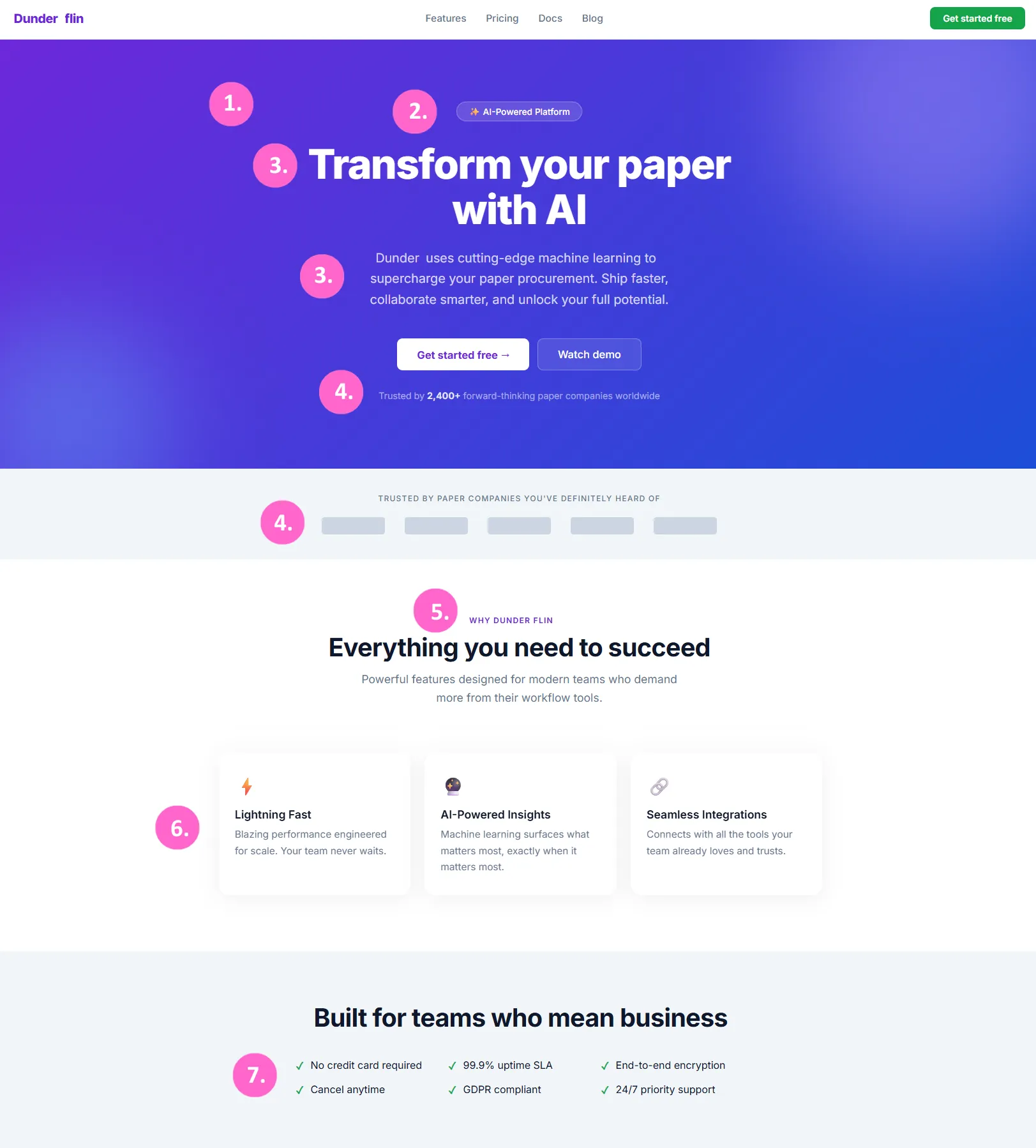
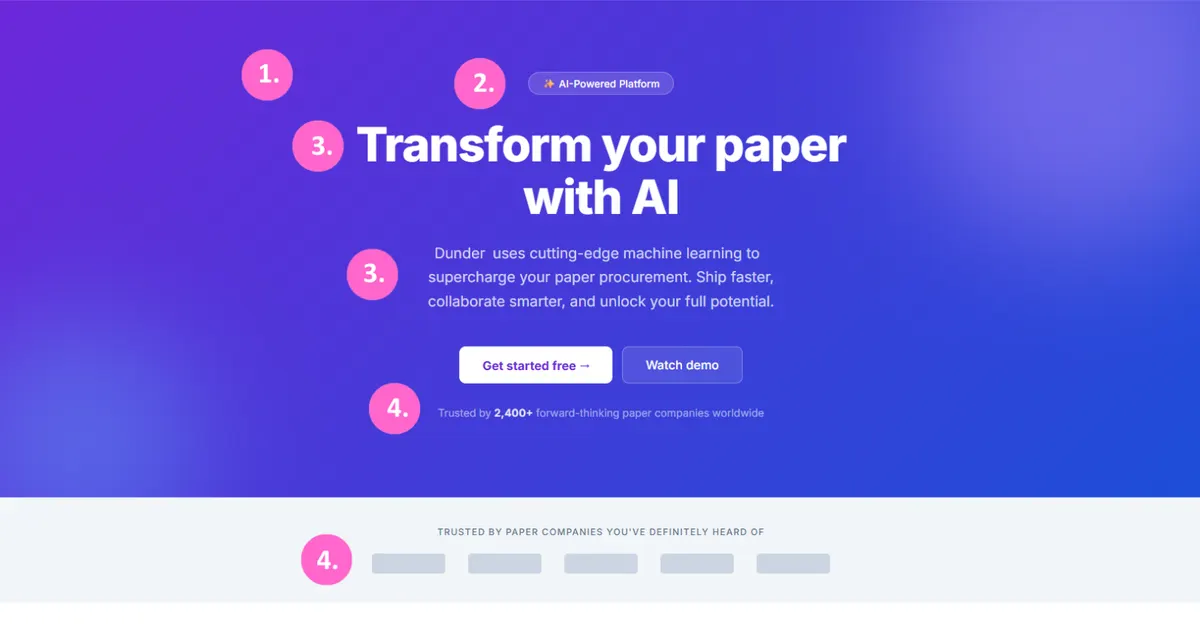
A mock-up of a fictional company’s homepage, built to show the tells. The numbers match the list below.
Its worst tells sit in the words as much as in the layout:
- A purple-to-indigo gradient hero with soft glowing blobs.
- A pill badge with a sparkle emoji (“AI-Powered Platform”) above a centered headline.
- A headline and subhead that fit 10,000 other sites: “Transform your paper with AI”, “cutting-edge machine learning to supercharge your paper procurement”, “unlock your full potential”.
- A number nobody can source (“Trusted by 2,400+ forward-thinking paper companies worldwide”) and a strip of logos that are only gray boxes.
- A small uppercase label above a generic heading (“Everything you need to succeed”).
- Three identical cards with emoji instead of icons, and claims that prove nothing (“Lightning Fast”, “Seamless Integrations”).
- A tick list of promises with no proof behind them (“99.9% uptime SLA”, “24/7 priority support”).
The second example is the hero I made with Lovable:
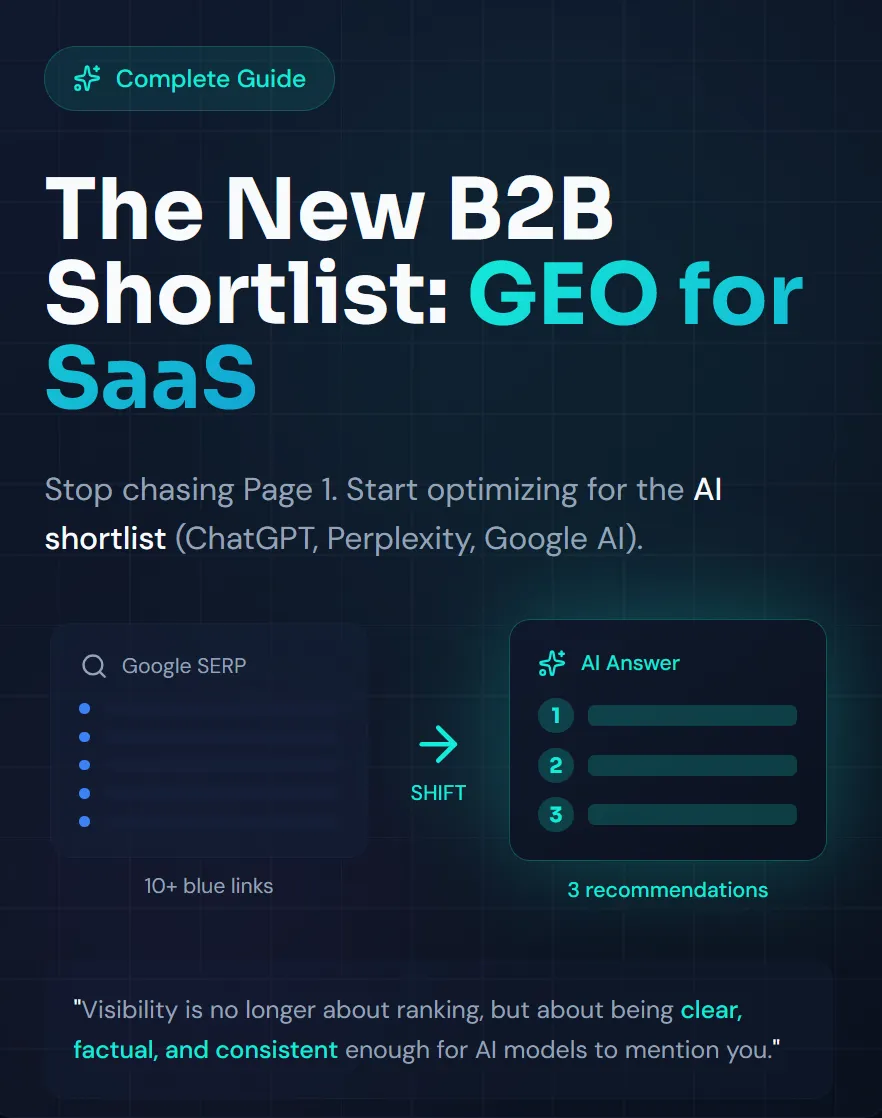
A hero made with Lovable. Count the tells.
Counted with the same list, it shows at least these:
- A pill badge with a sparkle icon above the headline (“Complete Guide”), and the same sparkle again on the “AI Answer” card.
- Accent color on the key words of the headline, the subhead and the quote, repeated in each.
- A dark background with a fine grid, and a glow behind the answer card.
- Two mockup cards with the same rounded corners, and numbered circles 1, 2, 3.
- A small uppercase label (“SHIFT”) between the cards.
- Copy built as “Not this. That.”: “Stop chasing Page 1. Start optimizing for the AI shortlist.”
On my count of the 16 tells that a screenshot can show (all 18 except the fade-up and the anonymous testimonials), it scores 10, as high as the highest of the eight B2B sites I checked further down. Between the two examples the colors changed, from purple and indigo to dark and teal. The habits stayed. A label, an accent, a glow, a mockup and a slogan. A tidy page can still look made by nobody.
Signs of AI in a website’s source code
Some tells sit below the surface: in the basics a quick build skips, in the stack, and in the page source and scripts you can open in the browser tools.
Gaps that come with fast builds
These gaps aren’t signs of AI in themselves. Plenty of handmade sites have them, and I found no study that compares how often AI-built and handmade sites do. What they point to is a site that was built quickly and never reviewed. Anyone can check for them in a few minutes:
- A contact address that isn’t on the company’s own domain, or none at all.
- Weak SEO basics, such as a missing meta description, a missing or second H1 or missing OpenGraph data.
- Headings that jump from H1 to H4.
- Images without alt text.
- Console logs left in the build.
- Pop-ups that cover content, weak contrast on dark backgrounds and layouts that don’t scale to a phone.
Builders on Reddit name these gaps when they talk about AI-built sites, and kaplich, who analyzed 100 vibe-coded sites on dev.to, found the same kind. His sample was showcase pages, and he used his own tool, so read it as a pattern, not a rate. Treat a cluster as a reason to look closer. A single one means nothing.
The stack that generated sites share
For new apps, OpenAI’s GPT-5 prompting guide recommends Next.js, Tailwind, shadcn/ui or Radix for components, icons from Lucide, Heroicons or Material Symbols, and fonts such as Inter, Geist or Manrope. That is a reasonable toolbox. It is also a plausible reason why so many generated sites share the same cards, the same icons and the same type, although nobody has measured that link.
Comments left in the source
Comments are another place to look. They ship to every visitor, so open the page source or the script files in the browser tools and you can read them. I opened the source of a Dutch agency site that looks entirely handmade. It held 32 comments. Eight were longer than 250 characters. They explained decisions with measured numbers and recorded what the code used to say. They pointed to the team’s own check scripts. Generic labels such as “Header”, “Main Content” and “Footer” sat beside them.
That is how an AI coding assistant tends to write notes to itself. A careful developer can write like that too, so I read it as a hint and not as proof. It does show something useful. A site can look made by a person and still be built with AI, so design and code are two separate checks.
The same habit turned up in the JavaScript files of the other sites I checked. Of eight homepages, three had dozens of explanatory comments in their own scripts, and one had dated its notes in the week before I looked.
What Anthropic and OpenAI say about their AI design defaults
Both Anthropic and OpenAI publish guidance that names the defaults their models fall into. The table shows which design tell each one names, based on the pages I read. A gap means I didn’t find it there. That is not a denial.
| Design tell | Anthropic | OpenAI |
|---|---|---|
| Inter, Roboto, Arial or system fonts | Named as defaults (Nov 2025) | Told to avoid them (GPT-5.4 guide); the earlier GPT-5 guide still recommended Inter and Geist |
| Purple on white | Purple gradients on white | “Avoid purple-on-white defaults” |
| Flat, single-color backgrounds | Named as a default | Told not to rely on them |
| Identical rounded cards, the SaaS card grid | In its frontend-design skill | “Generic SaaS card grid as the first impression” |
| A big number over a small label, stat strips | In its skill | Stat strips, pill clusters and icon rows |
| Cream background, serif display, terracotta accent | In its skill | Not in the pages I read |
| Uppercase eyebrow above headings, 01/02/03 markers, one accented word in a headline | In its skill | Not in the pages I read |
| A fade-up on every section | In its skill | Not in the pages I read |
| Abstract gradients and fake 3D objects over real photography | Gradient washes as decoration | Told to prefer real photography |
A short timeline:
- 7 August 2025. OpenAI’s GPT-5 prompting guide recommends the Next.js, Tailwind and shadcn/ui stack above.
- 12 November 2025. Anthropic explains why its models converge on safe defaults (“distributional convergence”) and names the fonts and colors it means.
- March 2026. OpenAI’s GPT-5.4 frontend guide tells its model to avoid the same defaults.
- October 2026. Anthropic’s current frontend-design skill lists cream, serif and terracotta as a tell, including the accent color of Claude’s own interface (
#D97757) if a brief ends up there.
Read the table as vendor admissions, not as a detector. A style that points at one tool proves nothing, because designers mix tools and every vendor now tells its model to avoid its own defaults.
AI-generated website examples: three kinds I found in eight B2B sites
I ran eight B2B homepages through the same checks: the tells above, counted from the first three screens of each, and the comments left in the source. Eight sites is a sample, not a study, and I can’t prove any of them was built with AI. Three patterns showed up. By “deliberate” below I mean that you can point at something only this company would have chosen: a color, a drawing, a photo or a sentence that wouldn’t work on a competitor’s site.
It looks like AI. Three sites matched 8 to 10 of the 16 tells I counted. Between them they show most of the list: a serif headline with one italic word, small uppercase or monospace labels above the titles, cards with the same radius and soft shadow, a dashboard mockup, a strip that scrolls by itself. One put an em dash in its own headline. It averaged almost nine per thousand words, while the other sites stayed between zero and three.
It looks deliberate, but it was built with AI. One site scored 2.5 out of 16. It has its own color, a real founder on camera and an illustration that belongs to it. Its source tells another story. Long comments explain each decision with measured numbers and a history of what the code used to say. A second site has its own palette and real photos, yet its scripts carry dozens of notes dated in the week before I looked. This is the group a design check alone misses.
It looks deliberate, and I found nothing pointing at AI. One site scored 6.5, because it follows the current dark, serif and monospace style. It also has corner marks around its buttons, its own isometric drawings and short code comments quoting measurements from a design file. A second site is long and specific. Its scripts hold no explanatory comments.
The eighth site fit none of the three: it was clean and plain, and its code was hard to judge.
The site that scored 6.5 is the lesson: a high count doesn’t make a site generic when someone chose the defaults. That is why I count tells and then look at the page.
Why an AI-looking website matters for a B2B SaaS brand
A buying committee looks for reasons a vendor is safe. A site that looks like everyone else’s says you’re competent and interchangeable.
In our Opinion Density framework, which multiplies the strength of a point of view by how consistently you repeat it, that is the “recognizable, but replaceable” quadrant: consistent enough to look professional, with no point of view strong enough to remember.
Why banning the tells in your AI prompt doesn’t fix them
Tell an AI tool to skip purple and Inter and it will. Then it reaches for the next defaults: a cream background with a terracotta accent, a serif headline with one italic word, tiny monospace labels, hairline rules borrowed from a newspaper. Those are already turning into tells. The vendors have noticed the same loop: the table above shows both of them telling their models to steer away from the same fonts and the same purple on white.
In an experiment on solodesign.cc, written anti-slop guidance did not reliably reduce the tells in generated pages, while a mechanical check did. It was 42 hand-rated builds scored with the author’s own detector, so take it as a hint.
Overcorrecting fails too. Parallax, custom cursors and animated backgrounds don’t make a site distinctive. Memorable sites tend to be restrained, with few choices applied everywhere.
How to avoid an AI-looking website without a brand agency
A full brand project solves a bigger problem than most early SaaS companies have. Many of the founders I work with can’t afford one, and they often don’t need one.
What they need is smaller: a handful of deliberate choices, made once and applied everywhere. A palette with roles, a type pairing, one radius and spacing scale, one idea for the structure of the page and one detail someone will remember. It is a list, not a brand identity.
It is also the list to give an AI tool before it builds anything, because the tool fills every gap you leave with its own default.
How to set up a website build with AI in 3 steps
Most generic sites are generic because the tool had nothing specific to work from. In my experience, three things fix that before the first page exists. It is my reading, not a measured effect.
1. Give the tool a brain with two layers
I recommend giving the tool a brain with two layers:
- The knowledge layer is the collective knowledge of you, your team and your company: existing content and SOPs, sales calls, interviews and podcasts. It is usually built once and left untouched. It works better when it stays connected to your AI agents and the internet, so it keeps updating.
- The context layer is where many founders fall short. They have plenty of knowledge but lack the context to turn it into action: positioning, ideal customer profile, strategy and goals. With it, the system understands not only what to say but also when to publish, when to hold back and when to trigger an email.
Without both, the tool writes the average page for your category, and that is the headline that could sit on 10,000 other sites. How the fastest-growing B2B SaaS companies feed founder knowledge into what they publish is the subject of our article on founder-led marketing.
2. Write a design system before the first page
If you build the site yourself with AI, make the design system first. Ask Claude Code to write the handful of choices from the previous section as files: the palette with roles, the type pairing, the radius and spacing scale. Add the components you need and a do-not list. Then build the pages from those files and not from a prompt.
It works with Codex too. Codex reads a project file called AGENTS.md before it starts work, just as Claude Code reads CLAUDE.md, so the design system can sit in the project whichever tool you use.
3. Keep the site easy to update
Astro with a headless CMS such as Sanity is a good way to maintain it. Astro builds the pages, and Sanity holds the content in a studio where an editor can change text without touching the design. That keeps the design system intact. Astro’s own documentation lists an official Sanity integration.
We scanned our own website for AI design tells
Our own site was built with Claude Code, from a design system we chose, which makes it a fair test.
Across 105 pages, the scan counted 313 uppercase labels above headings. On the homepage, 12 sections carried one. Eight sparkle icons stood in for anything labeled AI, and four pages had more than eight frosted-glass panels. None of it looked wrong on its own. Together it read like a template.
What we changed
| What the scan counted | Before | After |
|---|---|---|
| Labels above headings, homepage | 12 | 5 |
| Labels above headings, on the 19 pages we reworked | 150 | 73 |
| Pages with a label on more than 40% of their sections | 35 | 21 |
| Pages with more than eight blurred glass panels | 4 | 0 |
| Sparkle icons | 8 | 0 |
| Text filled with a gradient | 8 | 2 |
We also removed a faint grid from the hero. The pink glow around five homepage elements went too. The 19 pages are the homepage, the programs, the industries, the about page and the examples, in English and Dutch. We left the rest alone. Those are mostly articles and service pages with one or two labels each, so the count for the whole site only fell from 313 to 236. A second site of mine shares components with it and carried the same tells, so we ran the cleanup twice.
What we kept on purpose
The light that follows the cursor and the shimmer in the hero stayed, because they are ours and they do something. The stat strip stayed because its numbers are true. So did the “Limited availability” label, because it is accurate.
A choice somebody made is not a tell, even when it appears on the list.
What we learned
- A scan counts what is in the code, not what a visitor sees. It kept counting gradient-filled text after we had flattened it, because the clipping rule was still there. It also couldn’t tell us that taking the blur off a panel makes it look gray. We put the saturation back.
- We changed one thing at a time and checked it. Most steps were built, compared page by page against the previous build and photographed before and after. That is how we saw that the call-to-action band looked different without its blur, and kept the blur.
- The effect is small. A visitor won’t notice a missing label. What changes is the rhythm of a page. We have not measured visits or enquiries, so I won’t claim an effect.
How to fix an AI-looking website in six steps
Take them in this order. The first two cost almost nothing, and together they prevent most of what the rest has to repair.
- Repair what is broken or missing. A layout that falls apart on a phone, a page with no description or with a second H1, a contact address that isn’t on your own domain. Buyers mostly shortlist before they visit, so a broken page hurts before taste does.
- Write the direction down before anything is generated. That is the list of choices and the design system from the sections above. Put them where your tool reads them every session, such as CLAUDE.md, AGENTS.md or a DESIGN.md.
- Pick references, then compare three layouts. Choose about six sites and write down the principle you take from each, not the look, since researchers call copying an example’s surface fixation. Then ask for three layouts described by structure, what sits where and why, and judge them against each other instead of polishing the first. I also like to ask Claude how it would make a section feel more premium. That doesn’t always work, and it works better when I give an example of what premium means to me. The suggestions are often good, though, so I treat them as a second opinion and check the result against the tells again.
- Count the tells. Walk through the list above page by page. Krebs treated four or more patterns on a page as the heavy band, so read that as a cue to cut. Whatever you can count by machine, such as labels per section, blurred panels, gradient text and sparkle icons, can run as a check before each release.
- Cut what has not earned its place. For every move, ask whether you would have made it on any similar page. If the answer is yes, it’s a default, and you either change it or say why it fits. The label, the glow, the gradient and the animation go first.
- Swap in real material, then let someone who knows the brand look. Use a product screenshot over an abstract shape, a named customer with a number over an anonymous quote (our own success stories follow that rule), a photo of your team over a render. Check every page at phone width, because generated sites drift most where nobody looks, and repeat the pass every quarter.
FAQ about AI-generated websites
Does Google penalize a website built with AI?
No. Google’s guidance looks at the pages, not at the tool that produced them. Using AI is not against its guidelines. What its spam policy targets is scaled content abuse, meaning many pages generated mainly to manipulate rankings with little value for users, “no matter how it’s created”. So the risk with an AI-built site is the ordinary one: thin or unchecked content, and technical gaps such as missing titles, descriptions and headings. Google’s own page adds one rule. Fact-check and review AI-generated content before you publish it.
Can you tell if a website was made by AI?
Not with certainty. You can see whether the design shows deliberate choices, and generated output often skips them. Count the signs, then look at the page yourself.
What is AI slop design?
AI slop design is the name people give to the generic look a generated site falls into when nobody directs the tool: the same fonts, purple gradients, identical cards and labels above every heading. Anthropic’s own prompting guide uses the term, saying that without guidance its models can default to generic patterns that create what users call the “AI slop” aesthetic. It describes a look and not a quality verdict. A site can have the look and still work, and a handmade site can have it too.
Is it a problem if my site was built with AI?
Not by itself. A site built with AI from a clear brand direction, real product visuals and your own copy can look entirely like yours. A site built from a one-line prompt won’t.
Do B2B buyers notice?
Some do, and some won’t consciously. No study I found shows that AI-looking design lowers B2B conversion, so I won’t claim it does. Consumer research says looks shape credibility judgments, and buyers usually shortlist before they visit, so the site mostly confirms or undercuts a reputation that already exists.
Can you tell which AI tool built a site?
Not from the page. A style hints at a tool’s habits, but designers mix tools, and every vendor now tells its model to avoid its own defaults. The strongest hint sits in the source, such as long explanatory comments, and even that proves little.
Does an em dash prove that AI wrote the text?
No. Plenty of human writers use them. It is a weak signal on its own and a stronger one when it sits next to several other habits.
Check what your site is really saying
A recognizable site rarely decides a deal alone. If yours could swap logos with a competitor’s and nobody would notice, the cause usually sits upstream, in positioning that never got sharp enough to show. A Founder-Led GTM Audit looks at whether your message, your visibility and your site tell one story.